Introducing Automation Studio: Craft, Debug, and Deploy Browser Agents Faster

A unified IDE built specifically for browser agents — combining code editor, live browser preview, and one-click deployment in a single environment.
TLDR
Unlike Browserbase (infra-only), Replit (general platform), or Cursor (general code IDE), Notte’s Automation Studio is built specifically for browser agents, combining agent tooling, managed infra, and an IDE that keeps you in control of the whole workflow, not at the mercy of a black-box agent. The idea being craftsmanship for browser automation, not magic: you stay in the loop from first line of code to production run.
The IDE Your Browser Agents Deserve
Building reliable browser agents shouldn't require juggling multiple tools. Today, we're launching an Automation Studio.
A unified development environment designed from the ground up for web workflows, it combines everything you need to craft, debug, and deploy production-grade browser automation.
The Problem We're Solving
Browser automation developers face three major pain points:
- Context switching hell: Bounce between your code editor, browser tabs, log dashboards, and deployment platforms. This fragments focus and kills iteration speed.
- Debugging blind spots: Most frameworks show you what the code says happened, not what the agent actually saw in the browser. You're debugging blind.
- Deployment friction: Getting your local automation to work as a public API requires dealing with servers, containers, and complex infrastructure setup
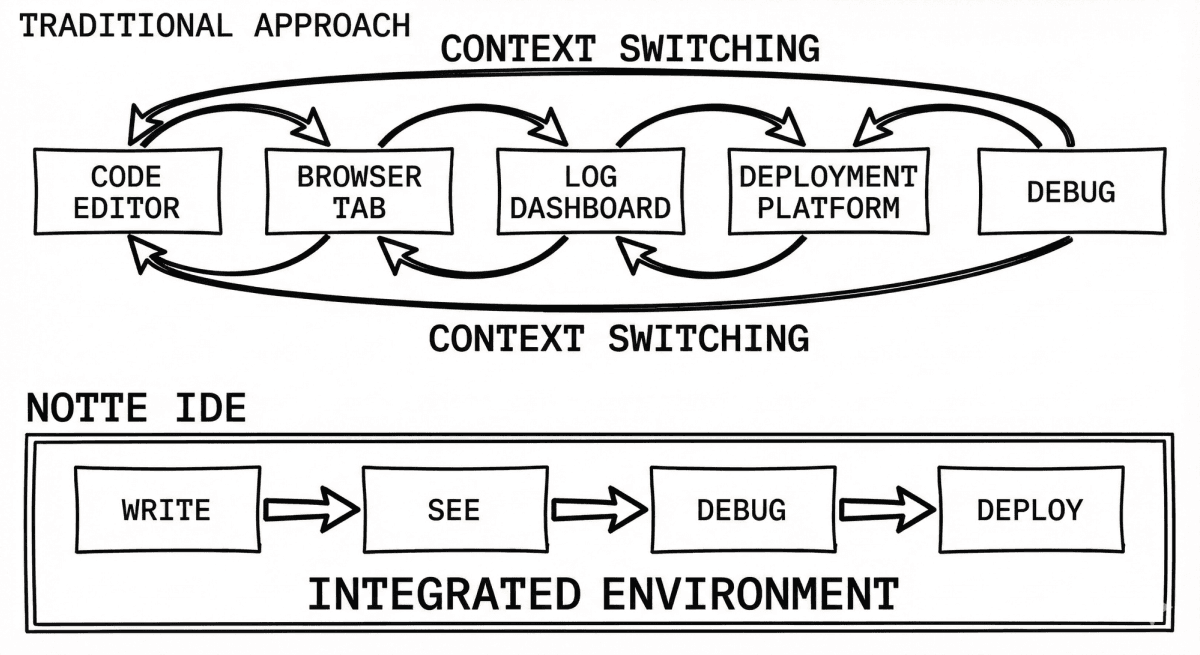
Existing tools solve one or two of these problems in isolation. Browserbase excels at browser infrastructure but leaves you in your own IDE. Replit makes deployment simple but gives you no visibility into what your agent is actually doing. General code IDEs like Cursor work for coding but weren't built for the unique demands of browser automation.
What the Automation Studio Includes
1. Integrated Code Editor
Write your agent scripts and hybrid workflows in a purpose-built editor. Define deterministic steps (e.g., session.execute(type="click", "selector": "body") with AI fallbacks for graceful error handling or dynamic action requirements. Full syntax highlighting and live feedback as you develop your automation.
2. Live Browser Session Viewer
See exactly what your agent sees, in real-time. As your workflow executes, watch the browser state evolve on the right side of the screen. This isn't a static screenshot; it's a live window into your agent's perception. When things go wrong, you know exactly where and why.
3. Actionable Execution Logs
Every step in your workflow is logged with:
- The action taken (navigate, click, type, extract)
- The DOM state and selector used
- Hybrid workflow transparency (when and why deterministic code handed off to AI)
- Intervention points
4. One-Click Deployment
Your working script becomes an API endpoint instantly. Publish and start scheduling with cron jobs. Notte manages the infrastructure (proxies, session scaling, credential vaults, CAPTCHA solving) behind the scenes.
Hybrid Workflows: Code + AI for Reliability
One of the IDE's most powerful features is support for hybrid workflows - deterministic code with AI fallbacks.
Write your core logic as reliable, predictable steps.
Then, when deterministic selectors fail or the page layout changes, an agent takes over.
Built for Browser Agents, Not Retrofitted for Them
This is the key differentiator. The Automation Studio isn't a general-purpose code editor adapted for agents. It's built specifically for browser automation from the ground up.
- Agent tooling is integrated: Personas (unique identities for your agents), Vaults (secure credential storage), proxies (stealth browsing), all accessible from the Console without context switching.
- Browser-specific primitives: Session management, DOM inspection, CAPTCHA solving
- Managed infrastructure: You don't think about servers or scaling. Write your agent, deploy it, and Notte handles the rest.
The Craft Positioning
We believe building browser agents should feel like craftsmanship, not magic.
Too many "AI agent" tools promise autonomy and then disappear into a black box. When they fail (and they will), users blame the tool and abandon it. The tolerance for failure with outcome-sold AI agents is orders of magnitude lower than with developer-framed tools.
By giving you visibility, control, and fast iteration loops, we shift agency back to the builder. You see what the agent sees. You debug like a craftsman supervising an apprentice. You own the outcomes (successes and failures alike), which means you iterate, improve, and eventually ship.
Developers keep iterating and build amazing things.
From Craft to Scale
The Automation Studio is just the beginning. Once your agent is working:
- Publish as an API endpoint with one click
- Schedule with cron for recurring automations
- Scale seamlessly with managed infrastructure (proxies rotate, sessions auto-scale, credentials vault stays secure)
- Monitor and audit for enterprise compliance (every action logged, traceable to agent identity)
Your crafted agent is now a production system. No DevOps required.
Get Started
The Automation Studio is available now in the Notte Console.