Anything API: Best Practices

Patterns from early users and our own testing to help you build more reliable Anything API endpoints — from writing better task descriptions to handling edge cases.
Anything API: Best Practices
We've been collecting patterns from early users and our own testing since launch. If you're building endpoints with Anything API, these will save you build iterations and produce more reliable results. Most of them come down to giving the agent better inputs and knowing what to expect from the output.
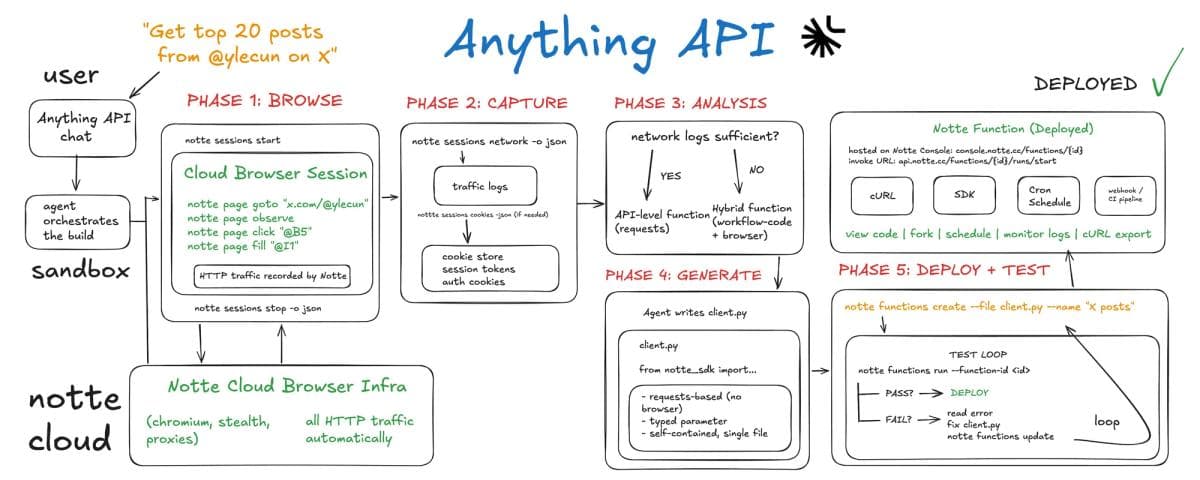
1. Know what gets built: direct API calls vs hybrid functions
The agent's default goal is to produce a function that calls the target site's APIs directly, with no browser involved at runtime. When this works the result is fast and unaffected by frontend redesigns.
When the site doesn't expose usable APIs for the task, the agent produces a hybrid function that combines API calls with browser automation. This is how Anything API covers sites that most automation tools can't handle at all, including fully server-rendered pages and complex interactive flows.
After deployment, the function appears on the Notte Console at console.notte.cc. Functions that call APIs directly are less affected by frontend redesigns. Hybrid functions are more sensitive to UI changes, which is why the agent targets direct API access whenever possible.
2. Write task descriptions as acceptance criteria
The agent iterates during the build phase. It generates the function, runs it, checks the output, fixes the code, repeats until the result matches what you described. Your task description is the spec it tests against.
Vague prompts produce ambiguous pass/fail conditions, which means more iterations and less predictable output. Specific prompts reduce build cycles and improve first-deploy accuracy.
Weak:
"Get trending repos from GitHub"
Stronger:
"Build an API returning the top 25 trending repositories from GitHub for today. Return each repo's full name, description, primary language, total star count, and stars gained today."
The second version gives the agent exact fields, a count, and a source. It can verify each of those on every test iteration. If it needs clarification it will ask follow-up questions before deploying, but a specific prompt means fewer rounds of that, saving time and reducing cost.
If you know the site uses a specific API or a public data source, mention it in your description. You still get all the value of a managed, hosted endpoint with scheduling and monitoring. The difference is the agent can skip exploratory browsing and go straight to building the function around that API.
3. Get specific about output structure
The agent produces structured data in whatever format you specify. If you don't specify, it makes its own decisions, and they might not match what your downstream code expects.
Good prompts define the shape of the response:
"Search Airbnb for listings in Tokyo for next weekend (Friday to Sunday). Return the top 10 results. Each result should include: listing title, nightly price in USD, rating, number of reviews, host name, and whether the host is a Superhost. Return as a list of objects."
If you're feeding the output into another system, describe the field names and types you need. The agent will structure its output accordingly and validate against it during the build.
4. A worked example: building a Twitter/X monitoring endpoint
Here's what a well-structured prompt looks like for a real use case.
Task:
"Get the 20 most recent posts from @ylecun on X (twitter.com). For each post, return: the post text, timestamp, number of likes, number of reposts, number of replies, number of views, and the post URL. If a post is a repost, include the original author's handle. Return results sorted by timestamp, newest first."
This prompt works well because it:
- Names the platform and the account
- Specifies the exact count (20)
- Lists every field the function should return
- Handles an edge case (reposts)
- Defines the sort order
Compare that to:
"Get tweets from @ylecun"
The second prompt would produce something, but the fields, count, sort order, and repost handling would all be the agent's best guess.
The same pattern applies to any site. The more precisely you define the output the fewer build iterations the agent needs, and the more useful the endpoint is on first deploy.
5. How authenticated flows work
If your task requires logging in to a site, describe the login as part of your task. The agent handles navigation and form filling during the build. For recurring runs, Session Profiles can persist your authenticated state across invocations so the function doesn't re-login every time (see below).
"Log in to my account on example.com and export my recent order history. Return order ID, date, items, and total for the last 10 orders."
The agent will ask for credentials during the conversation if it needs them.
For recurring or more complex auth workflows (2FA, persistent sessions across runs, credential rotation), the Notte platform provides dedicated tools you can use with your deployed functions via the SDK:
- Agent Vaults store credentials per domain with encryption. The agent accesses them through placeholders, so raw secrets never appear in logs or generated code. Set one up in a few lines:
from notte_sdk import NotteClient

client = NotteClient()
vault = client.Vault(name="my-vault")
vault.add_credentials(url="https://example.com", email="me@email.com", password="secret")  # pragma: allowlist secret
Then pass the vault to an Agent and it handles credential injection automatically.
- Agent Identities provide dedicated email addresses and phone numbers per agent, with automatic OTP interception for 2FA. If you store your MFA secret in a vault, the agent can complete 2FA login without human involvement:
persona = client.Persona(create_vault=True, create_phone_number=True)
# persona has: persona.info.email, persona.info.phone_number
# Read intercepted codes: persona.sms(only_unread=True)- Session Profiles persist browser state (cookies, storage, auth tokens) so subsequent runs skip re-authentication. Profiles are available through the Notte API. For setup, see docs.notte.cc.
These tools are configured via the SDK and API, not through the Anything API chat. They apply to Notte Functions you invoke programmatically. Connecting vaults and profiles to Anything API-generated functions is on the roadmap. For now, if your endpoint needs persistent authenticated access, the simplest path is to describe the login in your prompt and let the agent handle it during the build.
6. Check the Console after deployment
Every Anything API endpoint is a standard Notte Function. After deployment, you get a link to it on the Notte Console at console.notte.cc. From there you can:
- Set up cron schedules
- Monitor invocations and inspect run logs
- Copy the cURL command or SDK invocation snippet
The endpoint is a standard API. Call it from anywhere:
curl -X POST https://api.notte.cc/functions/{id}/runs/start \
  -H "Authorization: Bearer YOUR_API_KEY" \
  -H "Content-Type: application/json" \
  -d '{"query": "@ylecun"}'
Frequently Asked Questions
After creating an endpoint, can I refine it?
Yes. The agent iterates during the build until the function passes. After deployment, you can send follow-up messages in the same conversation to refine behaviour. The agent keeps the full context from the original build, so you can say things like "also return the number of bookmarks" or "change the sort order to most liked" without re-describing the entire task.
What happens if the agent can't build the endpoint?
The agent will tell you. If it can't find a viable path (complex OAuth redirects, WebSocket-only communication, or a fully server-rendered site with no usable API), it reports what it found and why automation isn't feasible for that site. It won't deploy a broken function.
Does this just break when a site changes its UI?
It depends on the function type. Functions that call APIs directly are unaffected by frontend redesigns. They can still break if the site changes its backend API, but that happens less frequently. Hybrid functions that include browser steps are more susceptible. In either case, a broken function returns an error, not empty or incorrect results. Managed self-healing, where functions automatically rebuild when breakage is detected, is in development.
Is AI used at runtime, or only during the build?
The build phase is AI-driven: the agent browses, analyses, generates, and iterates. For functions that call APIs directly, the deployed endpoint is a scripted HTTP client. Hybrid functions may include browser automation at runtime, but these are scripted replay steps, not live AI reasoning. The agent targets a fully scripted runtime wherever possible.
What about bot detection and anti-scraping measures?
Anything API includes Notte's stealth capabilities: residential proxies, CAPTCHA solving, and anti-detection tooling. A fair-use policy applies. The agent will refuse requests that violate a site's terms of service. LinkedIn automation, for instance, is blocked.
Can't I just build this with Claude Code or my own agent?
You could build a one-off version locally. The difference is the managed infrastructure. Anything API handles concurrent cloud execution, stealth, browser management, and keeps endpoints alive without your involvement. When you need 500 concurrent jobs running while you sleep is the true value prop of Anything.
How reliable are these endpoints at scale?
Functions that call APIs directly are standard HTTP clients, so they're as reliable as the target site's API. They run on Notte's cloud infrastructure and handle concurrent workloads. Hybrid functions carry additional fragility from browser steps, which is why the agent targets direct API access by default.
Can it access paywalled or login-gated content?
Yes, provided you have valid credentials. The agent handles the login during the build, and the deployed function maintains access. For persistent authentication across runs, Session Profiles (configured via the SDK/Console) store browser state so the function doesn't re-authenticate every time.
Where does the deployed endpoint actually live?
On the Notte Console at console.notte.cc. You get full visibility: the function code, invocation logs, scheduling, cURL export, and forking. The endpoint URL follows the pattern api.notte.cc/functions/{id}/runs/start. There are no proprietary triggers or workflow builders. It's a standard REST endpoint.
Can I schedule or trigger endpoints automatically?
Yes. From the Notte Console, you can set up cron schedules on any deployed function. You can also trigger endpoints from webhooks, CI pipelines, or any service that can make an HTTP request. The endpoint is a standard REST API with no proprietary triggers or workflow builders to learn."
Docs: docs.notte.cc | Try it: anything.notte.cc
Watch a demo here.